
Your first render
A video needs one thing from you: a topic. Every other control on the composer arrives already set, and the rest of the path is two presses and a wait.
Open the composer
Section titled “Open the composer”Home is the composer: one screen headed Editron 1.1, with the input box in the middle. It opens in Idea, the mode that writes a script from a topic you type. The button beside it, Voiceover, takes a recording of your own instead.
Type a topic
Section titled “Type a topic”The box asks What should this video be about? Ten characters is the floor, and the spaces at either end do not count.
Under the floor the submit button is dead, and the slot beside it says why: Add a topic over an empty box, A bit more once something is in it. That button is the arrow at the end of the row below the box, and it is called Generate — no word is printed on it.
What you type is the whole brief. Idea is where a subject becomes one, and the prompt library has finished topics to work from.
Leave the settings alone
Section titled “Leave the settings alone”Four settings sit in that row under the box, and every one arrives already set: Length, Voice, Style pack and Music. A topic on its own is enough to render — open one only to change it.
Press the arrow button
Section titled “Press the arrow button”Generate — the arrow at the end of the settings row — spends nothing. Its one outcome is the receipt, unless something is in the way: too few credits for this render, or too many of your renders already running. Either of those replaces the receipt with a sheet that says which, and neither sheet charges anything. Both are in Length and credits.
Read the receipt
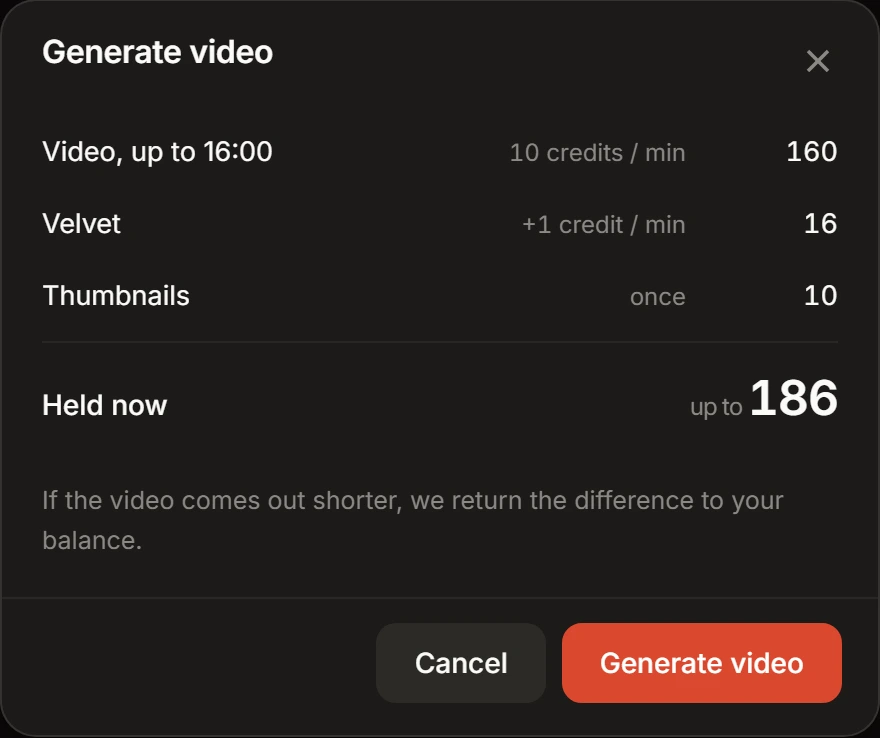
Section titled “Read the receipt”The receipt is headed Generate video, and every line on it is a charge the reservation will make — the video at its per-minute rate, a style pack that carries a surcharge, and Thumbnails when you have turned them on. In Idea the total reads Held now over the top of the length band you picked, and the difference returns to your balance if the video runs shorter.
The Generate video button at the foot of the receipt is the press that spends. Nothing is metered after it.
The render moves to a screen of its own, headed In queue until a slot frees up and Rendering once it has one. From then on the screen prints the range for the video you asked for: on the 14 – 16 min band it reads Usually takes 30-40 min. Close the tab if you want — the render does not need it open.
Download the MP4
Section titled “Download the MP4”The render’s screen turns into the finished one the moment it completes. The video plays right there in the page, and Download MP4 saves the file without leaving it.