
Subtitles
Subtitles are captions drawn into the video itself. The chip sits in the second row on the composer, and it is there in both modes.
No subtitle file comes with the render, so there is nothing to upload alongside the video.
Turning them on
Section titled “Turning them on”Clicking Subtitles opens the panel and does nothing else. The look you pick inside is what turns captions on.
The row of font chips above the list turns nothing on. Only a look does.
A × appears beside the chip once captions are on. It turns them off and puts the panel away with them.
Subtitles off means no captions in the video.
The ten looks
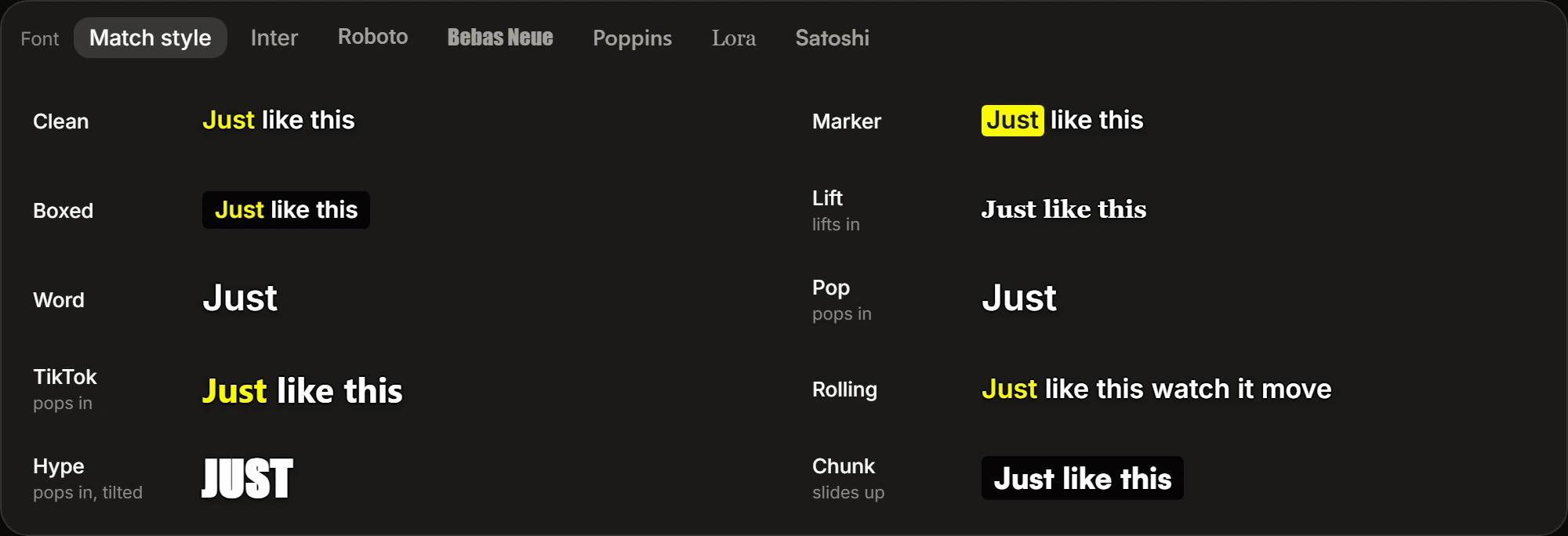
Section titled “The ten looks”Each row is a name and a running sample of it. The sample plays while the pointer is on the row or it holds keyboard focus, and the row you picked plays continuously. Nothing is ticked until you pick, and picking leaves the panel open, so you can put one look against another.
Four draw standing sentence text, changing a line at a time:
- Clean — plain outlined text, with the word being spoken picked out in colour.
- Marker — the same, with the spoken word sitting on a coloured marker instead.
- Boxed — the text sits on a dark panel rather than being outlined, and the spoken word is picked out in colour.
- Lift — serif text that lifts into place, with no word picked out.
Six are driven by the narration’s word timings, and how many words stand on screen at once is part of the look:
- Word — one word at a time, held still.
- Pop — one word at a time, each popping in.
- TikTok — three words at a time, popping in, the spoken one in colour.
- Rolling — six words at a time, held still, the spoken one in colour.
- Hype — one word at a time in condensed capitals, the largest type of the ten, each landing with a tilt, the colour alternating word to word.
- Chunk — three words at a time in heavy type on a dark panel, sliding up.
The font
Section titled “The font”A row of chips across the top of the panel, led by the word Font, sets the font every sample is drawn in. Change it and all ten redraw.
Seven chips: Match style, then Inter, Roboto, Bebas Neue, Poppins, Lora and Satoshi, each written in the font it names. Any of the six goes with any of the ten looks.
Match style is where the row starts, and it is not a font. Each look is drawn around a particular one — Lift on a serif, Hype on condensed capitals — and Match style keeps it, overriding nothing. That chip is written in whichever font the look you have picked would use.
Where the look comes from
Section titled “Where the look comes from”The caption layer is built from the look and the font you set here. A Style pack is not one of its inputs, so a render keeps the captions you picked whichever pack it carries. For what a pack does set, see Visual style.