
Length and credits
A render is priced by the minute, against a length fixed before it starts. In Idea that length is a band you pick; in Voiceover the file you uploaded has already set it.
The four bands
Section titled “The four bands”Length sits in the settings row under the box and opens a list of four bands, each printed as its two ends: 8 – 10 min, 14 – 16 min, 20 – 22 min and 29 – 32 min.
Kutly aims at one target inside the band you pick — 9, 15, 21 or 30 minutes. The bottom of the range is the shortest that band is expected to produce; the top is the figure credits are held against. Neither end is a runtime the render is held to.
In Voiceover the setting is on the row and cannot be changed. Your recording is the length.
The receipt
Section titled “The receipt”Generate, the arrow button at the end of the settings row, spends nothing. Beside it sits one figure — this render’s cost, qualified up to in Idea and bare in Voiceover — and pressing it opens a receipt, headed Generate video. The Generate video button on the receipt is what reserves the credits.
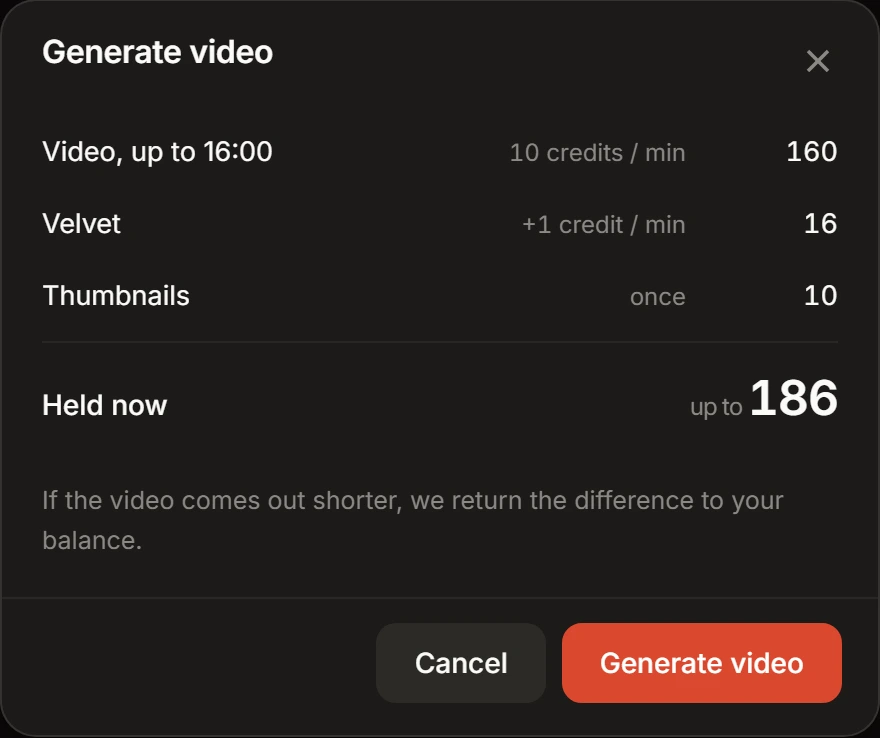
Every line on it is a charge the reservation will actually make. There are three possible lines and no others.
- Video — the length, then the rate per minute. Idea prints the top of your band, so the 14 – 16 min band reads Video, up to 16:00. Voiceover prints the length it bills.
- The style-pack line, labelled with the pack’s own name, appears only when the pack you picked charges a surcharge. It is charged per minute, and the packs that carry it are the ones in the picker’s Premium motion design column.
- Thumbnails — rated once, and on the receipt only while the extra is on.
With one line the receipt prints no credits beside it, because the line’s credits and the total’s are the same figure.
Held now and Charged now
Section titled “Held now and Charged now”The total is labelled by the mode, and the word is the promise. Idea reads Held now over a figure prefixed up to. Voiceover reads Charged now.
One sentence under it says what happens next. In Idea: “If the video comes out shorter, we return the difference to your balance.” In Voiceover: “Your narration sets the length, so this figure is final — there is nothing to return.”
A completed Idea render is priced a second time, and that second pricing only ever moves down. What was held is the most the render can cost, whether or not any of it comes back.
On a finished render, the Output card’s Cost row is the net of everything that moved for that render, so it is where a return shows up. The return can land a moment after the page does, and the row updates on its own.
How the figure is worked out
Section titled “How the figure is worked out”Length is rounded up to a whole 15-second block, priced at the per-minute rate, and rounded up again to a whole credit. A style-pack surcharge goes into the rate before any of that, because it is charged by the minute. The Thumbnails extra is added afterwards, flat.
The rounding is visible in one figure only: the Voiceover receipt’s video line, which prints the length being billed rather than the length of your recording. It cannot move an Idea figure at all — every band’s top is already a whole number of blocks.
Kutly prices the render on its own side, in the step that creates it. The rate, the surcharge and the thumbnail extra are read live each time the screen draws them, and can be repriced without a release. That is why the figures are on the screen and not on this page.
Two ways the click does not spend
Section titled “Two ways the click does not spend”Everything that could stop a render is answered before the receipt opens. Two of those answers replace it with a sheet.
Not enough credits. A short balance does not disable Generate: pressing it opens a sheet headed Not enough credits, carrying this render’s cost, your balance and what you are short, with Not now and See plans at the foot. In Idea it also says the full amount is held up front and the unused part comes back.
Before you press, the only sign is the figure beside Generate, which changes colour when it is more than your balance and is read out as such by a screen reader.
Too many renders already running. Each plan runs a fixed number at a time: one on Starter, two on Creator, five on Studio, and one on an account with no plan. Pressing Generate at that number opens a sheet headed Your renders are still going, which counts what you have in flight and puts the three plans side by side. In flight means queued or rendering.
Neither sheet charges anything, and closing one retries nothing — press again when you are ready. If a render finished while you were away, pressing again is all it takes; nothing needs reloading.
After the reservation
Section titled “After the reservation”Generate video is the last decision on a render. Nothing in Kutly stops one after that: the screen it runs on carries no button, and a project card grows its Download and Delete menu only once the render is over. A render still running cannot be deleted, because it is still holding your credits.
A render always reaches an end. One that fails returns the whole reservation, whatever stage it failed at, and one that goes silent is ended for you rather than left running, so it returns the reservation too.
Deleting a finished render returns nothing. It is already paid for, and deleting it removes the video and its files rather than the charge.
Where credits come from
Section titled “Where credits come from”Credits are one balance, held by your workspace and spent by every render in it. The foot of the sidebar prints it: the word Credits, the figure, and Upgrade, the whole row a link to the plans.
A plan is what puts credits there, and each one carries a number of credits a month. That screen is also where rollover, upgrades, cancellation and the charging rule are written out.