
Music
Music is the bed under the narration. The setting sits in the row under the box in both modes and opens a list of three — None, Music pack and Your own bed. It starts on None.
The finished video has no bed under it. Your narration is the whole of its audio.
Music pack
Section titled “Music pack”A pack is a scored bed in two parts. The intro is the hook: it plays once from the start and is mixed louder than what comes after, so the opening of the video has something carrying it. The loop follows and repeats to the end.
The preview button plays the loop rather than the intro, so the clip you audition in the picker is the bed under most of the video and not its first few seconds.
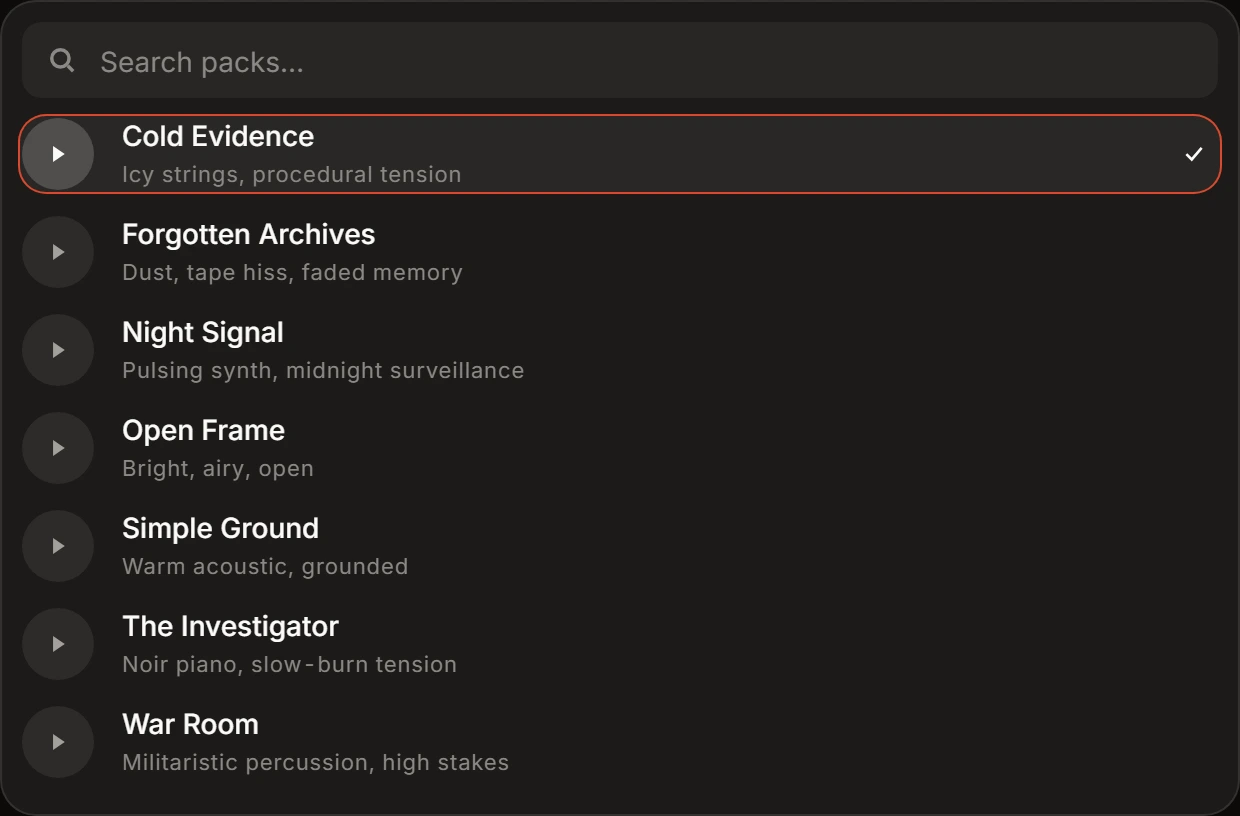
Choosing Music pack opens the picker, and the choice lands only when you click a pack inside it. Seven instrumental beds, one per row, each with its name and a line saying what it sounds like. A search box narrows the list by name, and while a preview plays a seek bar grows inside its own row.
Clicking a row picks the pack and closes the picker, and Music then reads the name of that bed rather than the words Music pack.
Your own bed
Section titled “Your own bed”Your own bed takes MP3, WAV, AAC or FLAC, up to 50 MB. Drop a file and it uploads at once.
Generate, the arrow button at the end of the settings row, is disabled while a bed is on its way up, and the slot beside it reads Finishing music upload… once that is the only thing it is waiting on.
Your file is looped to fill the video and cut at the end of it, so a short bed repeats and a long one is trimmed.
What music does to the finished video
Section titled “What music does to the finished video”The bed is one audio layer under the narration, which plays at full level over it.
What it costs
Section titled “What it costs”Music is free. Nothing you pick here moves the figure beside Generate, and the receipt has no line for it.