
Visual style
Style pack is the visual treatment a video inherits: its colour, its type and its motion. One pack rides with a render, and the setting is in the row under the box in both modes.
The six packs
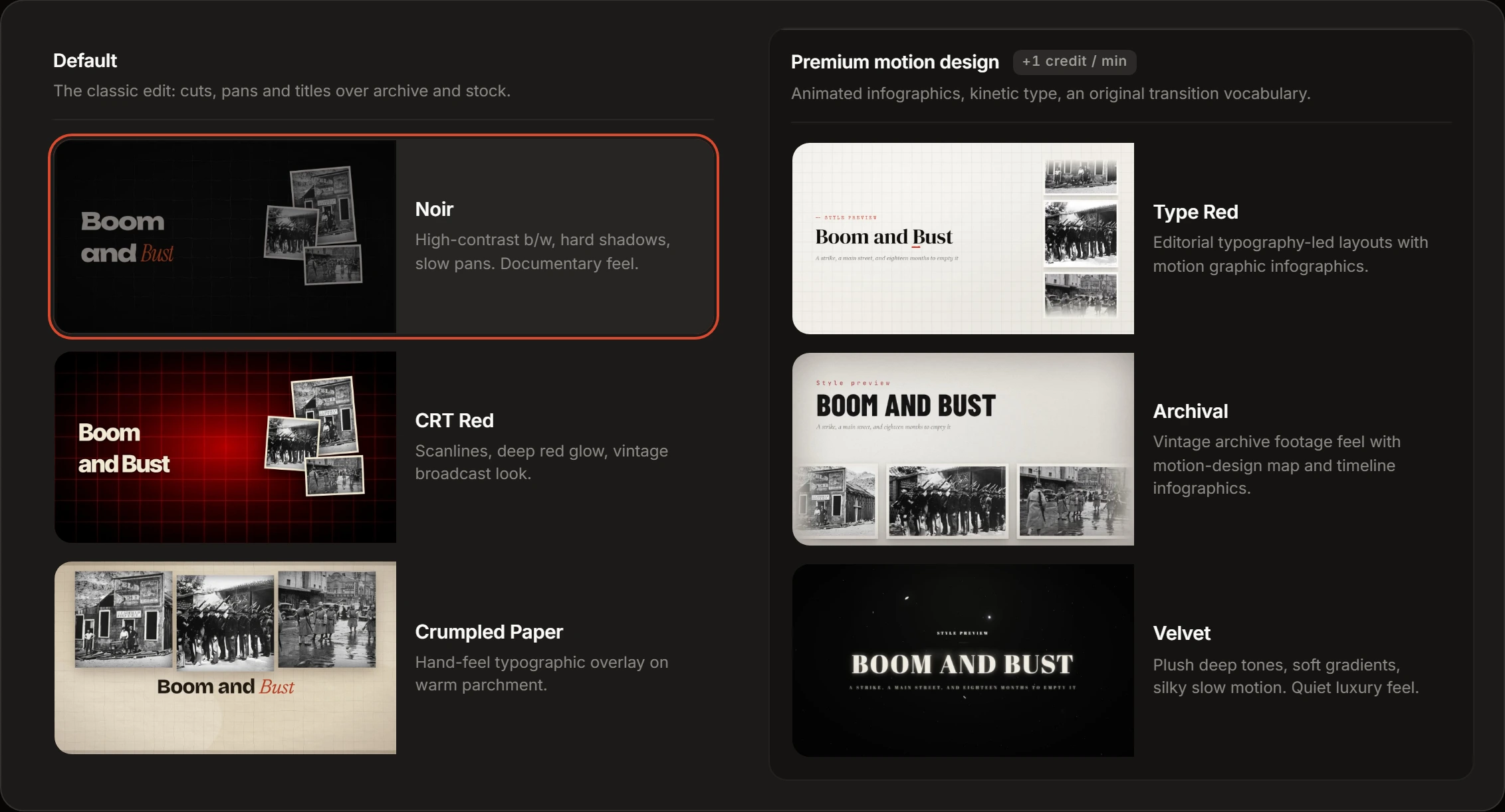
Section titled “The six packs”Six packs in two columns, all on screen at once. Each card is a 16:9 preview of its pack — a still at rest, a muted clip while the pointer is on the card or the card holds keyboard focus — with the pack’s name and one line under it. Set your system to reduce motion and the clip never plays: the still stands in for it.
Every card plays the same storyboard — the same subject, the same three beats, the same closing word — drawn each time by that pack’s own components. The clips are real renders, so what differs from one card to the next is the pack.
Default — The classic edit: cuts, pans and titles over archive and stock.
- Noir — high-contrast b/w, hard shadows, slow pans. Documentary feel.
- CRT Red — scanlines, deep red glow, vintage broadcast look.
- Crumpled Paper — hand-feel typographic overlay on warm parchment.
Premium motion design — Animated infographics, kinetic type, an original transition vocabulary.
- Type Red — editorial typography-led layouts with motion graphic infographics.
- Archival — vintage archive footage feel with motion-design map and timeline infographics.
- Velvet — plush deep tones, soft gradients, silky slow motion. Quiet luxury feel.
Clicking a card picks the pack and closes the picker; Style pack then reads that name. The setting starts on Noir.
What separates the two columns
Section titled “What separates the two columns”Each pack has its own set of full-frame graphics: the scenes a video is built out of when it is not showing footage.
The three Default packs are photo-driven. Each draws five: a subject cut out of its background, a framed photograph, a polaroid, a quotation, and one title scene. The title scene lands in one of two layouts, decided per render — the title beside a cluster of three photographs, or a filmstrip of three across the top with the title under it.
The three Premium motion design packs draw the text itself, full frame, and carry the infographics the column’s own line promises: bar, line and pie charts, a grid of key figures, timelines, and in Archival and Velvet a process diagram as well. No Default pack draws any of those. Photographs and quotations are in the premium set too.
Both columns also lay short text over the footage — a date, a figure, a name. Captions are a separate layer, and Subtitles is its own control.
Packs that cost more
Section titled “Packs that cost more”The three packs under Premium motion design carry a surcharge. It is added to the per-minute rate rather than charged once, so it grows with the length of the video. The three under Default carry none.
The picker prints the figure once, on that column’s heading. Style pack never repeats it, so with the picker shut the surcharge shows only on the receipt, where it takes a line of its own named after the pack you picked.