
Voice
Voice is who reads the script. It sits in the settings row under the box in Idea, showing the name of the voice it is set to, and clicking it opens the picker under the row.
What the picker offers
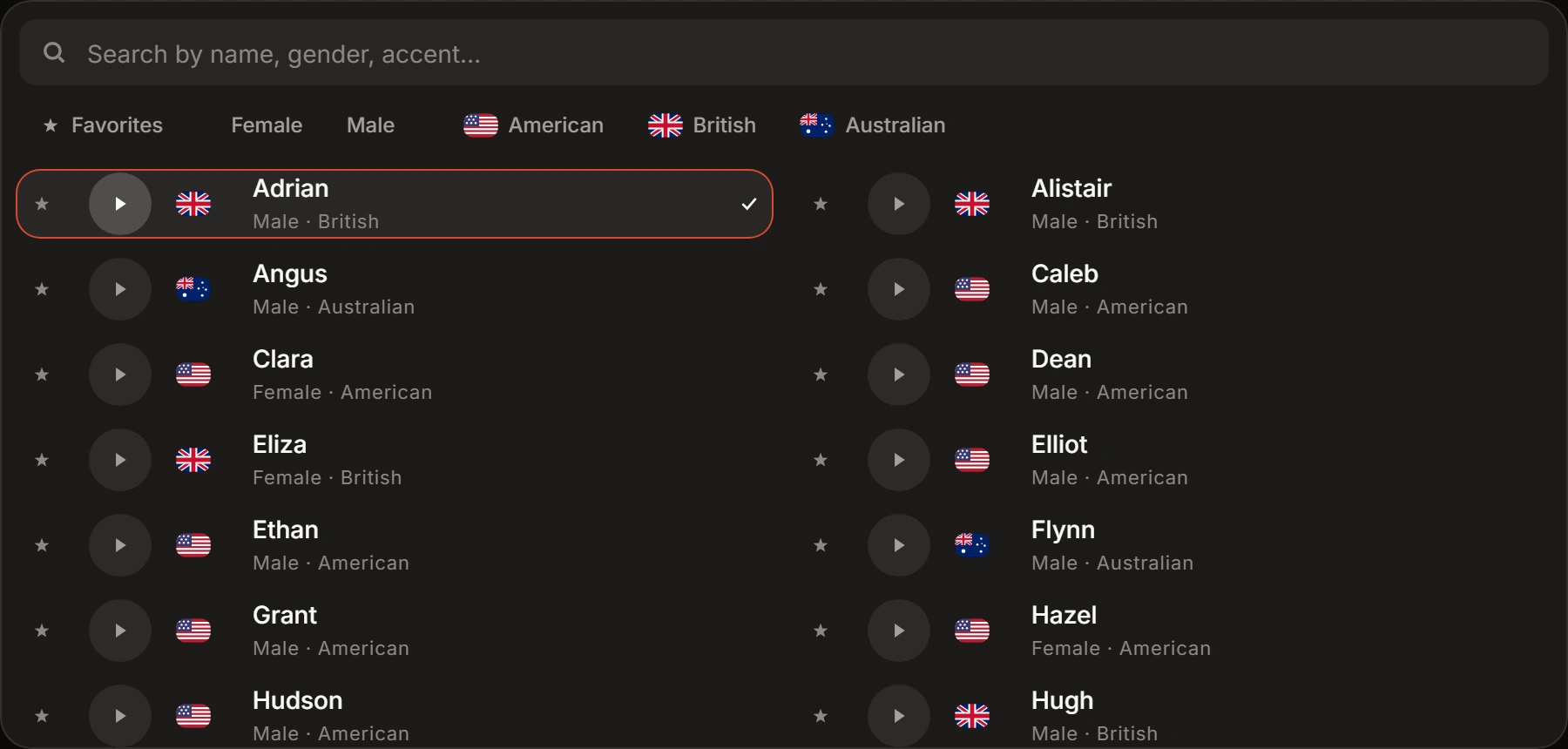
Section titled “What the picker offers”39 voices sorted by name, in two columns on a desktop window and one on a narrow one. A row carries a flag, the voice’s name, and a line under it giving gender and accent — Male · American.
Four ways to narrow the list:
- A search box over name, gender and accent.
- Favorites, which carries the count once you have starred a voice.
- Female and Male.
- One filter per accent: American, British, Australian.
A filter you have pressed clears when you press it again. There is no separate control for going back to the whole list.
Every row has a preview button that plays a clip of that voice, and it does nothing else. Clicking the row is what picks the voice, and it closes the picker. There is no Done and no Cancel: Escape, a click outside, or Voice itself all close the picker and leave the voice you already had.
Stars are held in this browser against your account. They do not travel to another device.
Voice starts on Caleb.
What the choice changes
Section titled “What the choice changes”One voice reads the whole script, and that narration is the audio the visuals are cut to.
It changes nothing before that. The script is written first, from your topic and the length you picked, and the voice is not one of the writer’s inputs.
Speaking rate comes with the voice. The picker has no speed control, and the rate sent with a render is the one held against the voice you chose.